Introducing the WhatsApp Media Action to Transform Workflows
As businesses and industries evolve, so do the tools required to meet growing demands. At Bosseo CRM, we recognize the necessity of innovation in communication, which is why we’re thrilled to announce our new feature: the WhatsApp Media Action. This feature is set to revolutionize how you interact with your audience by enabling the seamless integration of rich media into automated WhatsApp workflows. With this capability, you can propel your support flows and campaigns to unprecedented levels of engagement.

What Does This Mean for Your Business?
Media Supported
With the WhatsApp Media Action, businesses can now send diverse media types automatically as part of workflow steps, including:
–
Images:
Supported formats include JPEG, PNG, and more.
–
Videos:
Share engaging content using MP4 and other WhatsApp-approved formats.
–
Documents:
Easily send PDFs and various other file types.
–
Audio:
Share audio files in formats like MP3 and OGG.
In addition to these media types, the feature supports contextual captions for images, videos, and documents, allowing for a richer storytelling experience or providing clearer instructions.

Implementing the WhatsApp Media Action
The implementation process is straightforward:
1. Create or edit a workflow in your CRM environment.
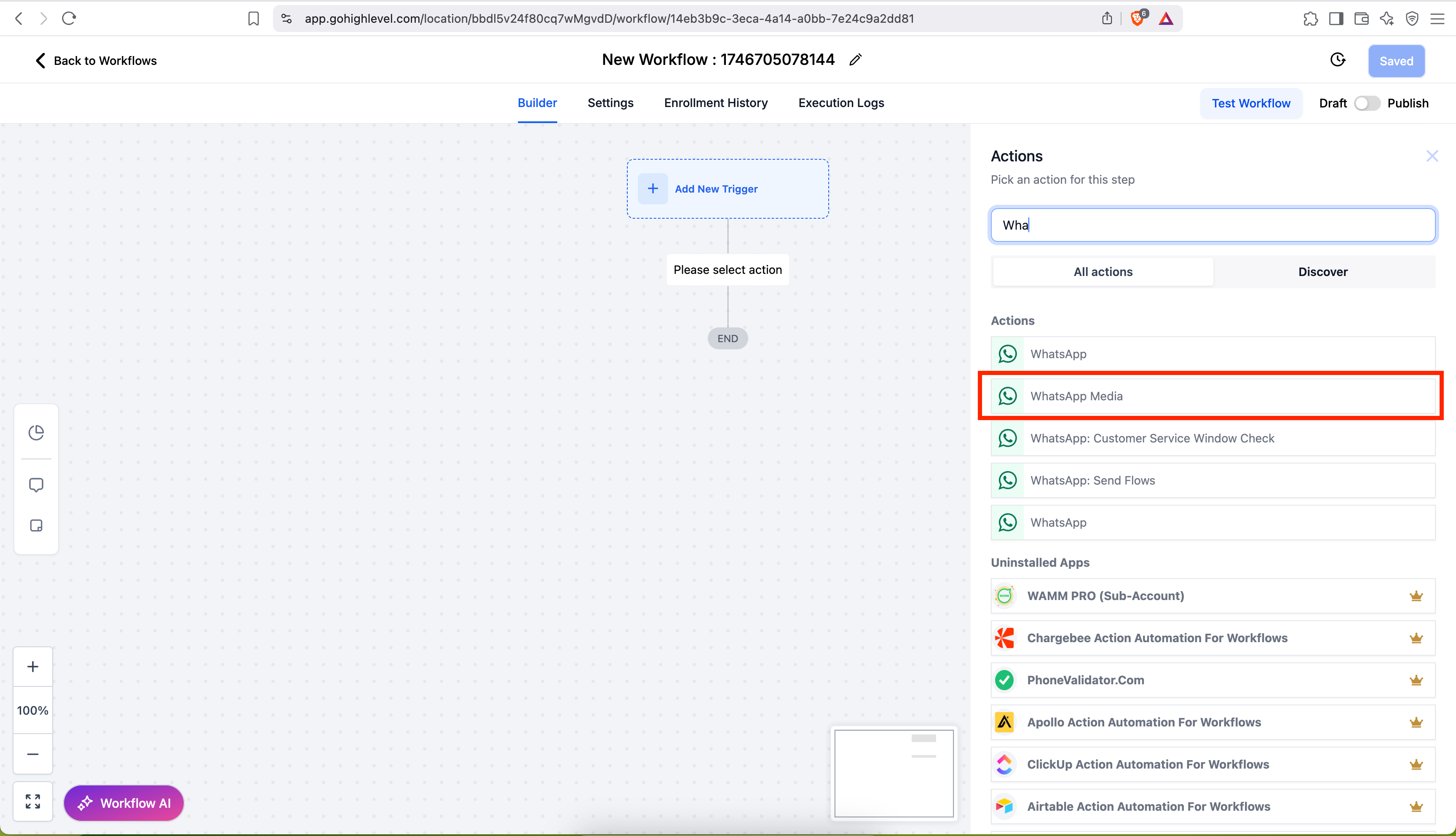
2. Add an action and select WhatsApp: Media.
3. Choose the type of media you wish to send—image, video, document, or audio—and upload your file. If applicable, include an optional caption.
4. Save and publish the changes to automate media delivery within your workflow.
Key Considerations for Optimal Use
–
WhatsApp API Constraints:
Audio files are sent without captions due to API limitations.
–
File Size:
Adhere to WhatsApp Business API guidelines on media size limits to ensure successful delivery.

Maximizing Business Benefits Across Industries
This feature finds diverse applications across various sectors, enhancing business interaction and efficiency:
Home Improvement
Home improvement businesses can utilize the WhatsApp Media Action by sending instructional videos or images to customers for DIY tips, promoting new services, or providing updates on ongoing projects. Sharing before-and-after pictures can captivate potential customers and increase referrals.
Legal Practices
For lawyers, securely sending documents for client review, such as contracts or legal notices, becomes streamlined. Legal practices can also use videos or images to demystify complex processes, helping clients understand their legal options more clearly.
Medical Practices
Medical practices can enhance patient interaction by sending appointment reminders, health check guidelines, or instructional videos on using medical devices. Sharing PDFs of health tips or aftercare instructions can improve patient compliance and satisfaction.
Conclusion
At Bosseo CRM, we continue to spearhead advancements that place powerful communication tools in your hands. The WhatsApp Media Action enhances how you reach and engage your audience by utilizing captivating multimedia, thereby enriching your communication and driving better outcomes. For a comprehensive setup guide and best practices, visit our support article [here](https://help.gohighlevel.com/en/support/solutions/articles/155000005235-how-to-send-whatsapp-media-images-videos-audio-document-via-workflow).
Empower your workflows. Elevate your customer interactions. Embrace the future of communication with Bosseo CRM.