

Introducing Product Wishlisting for Ecommerce Stores on Bosseo CRM
In the ever-competitive world of online business, maintaining a stellar customer shopping experience is crucial. At Bosseo CRM and Bosseo.com, we’re thrilled to introduce a cutting-edge feature — Product Wishlisting for Ecommerce Stores. Seamlessly linked with our Customer Access Center (CAS), this feature promises to elevate user engagement, drive repeat purchases, and enhance overall customer satisfaction.
What’s New in Product Wishlisting?
Designed to revolutionize the online shopping experience, our Product Wishlisting feature is a powerful tool that allows logged-in customers to save products they admire. Whether it’s a trendy gadget for tech enthusiasts or a stunning piece of decor for fashion-forward homeowners, wishlisting simplifies shopping and encourages future purchases.
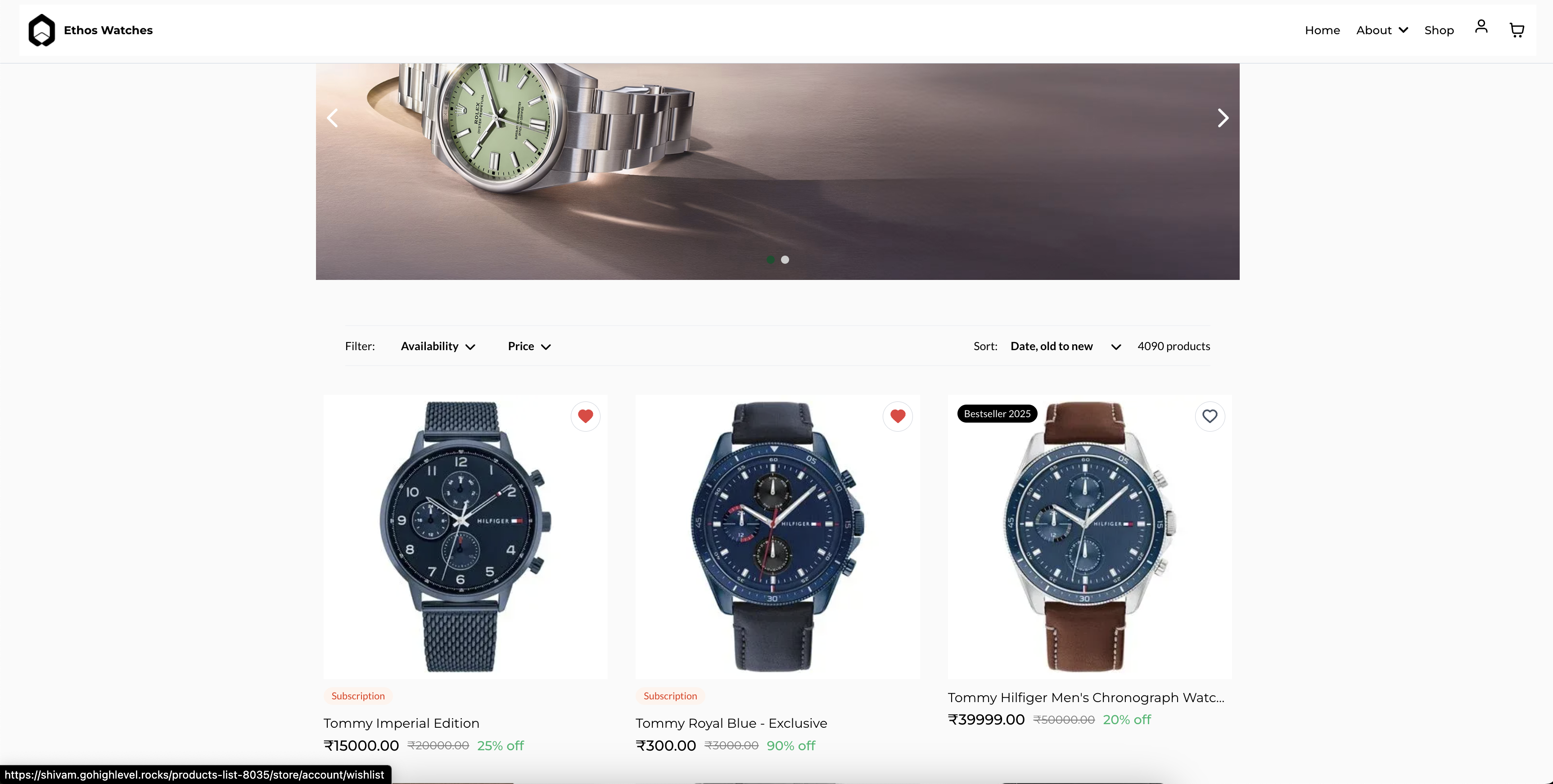


Key Capabilities
-
Builder Functionality
Store owners can effortlessly enable the Wishlist feature on desired pages such as the Product List Page, Product Details Page, or Featured Product Element. They enjoy full control over button color customization and can add a Wishlist menu under the Customer Login dropdown in the store’s navigation. Customers must be logged in to use the Wishlist; otherwise, the CAS login window is prompted.
-
Easy Access via Customer Access Center (CAS)
Customers can readily access their wishlisted items through a dedicated Wishlist page. Whether viewing saved items or removing them from the list, all Wishlist actions happen in the CAS.
How to Enable It?
- Access the Store Builder and go to your store pages.
- Select Product List, Product Details, or Featured Product element, then navigate to General Settings > Wishlist Products.
- Toggle on “Enable Wishlist Products” and customize the appearance with “Wishlist Icon Active Color” or “Wishlist Button Background Color”.
- Enable customers to access their wishlisted items by adding a new menu item for Wishlist. Go to redirection and set the Page as “Wishlist”.
- Save, publish changes, and verify domain linkage to ensure the Wishlist and login work seamlessly.


Use Cases Across Various Sectors
Home Improvement
For home improvement stores, wishlisting assists customers in planning future projects. Whether saving a power tool for a renovation or bookmarking a new range of tiles, customers can compile all their preferred choices without immediate commitment. This capability ensures that customers can return at their convenience and proceed with purchases, thereby enhancing the chances of conversion.
Legal Services
Though not traditionally a product-oriented service, legal practitioners can use the wishlist feature for saving essential legal packages or document bundles that might require future purchases. This enhances the accessibility of their offerings and prompts clients to revisit for additional services or document upgrades.
Medical Practices
In the world of medical services, clinics offering supplies or wellness products can considerably benefit from wishlisting. Patients might choose to save health supplements or medical devices they plan to buy later after consulting with their healthcare provider. Making health products easy to access and save helps patients maintain better health management strategies.
In conclusion, Bosseo CRM’s Product Wishlisting feature enhances customer engagement by offering a tailor-made shopping journey. Whether in home improvement, legal services, or medical practices, the ability to save and manage desired products fosters a customer-friendly experience and leads to increased loyalty and repeat purchases.

