WhatsApp Template Support in Snapshots: A New Era for Bosseo CRM Users
We at Bosseo.com are thrilled to announce the integration of WhatsApp Template support in our CRM’s Snapshots feature. This innovation promises to transform how agency owners manage and duplicate WhatsApp templates across various sub-accounts, offering a more streamlined, efficient, and error-free approach to business communication. This feature stands to benefit a myriad of sectors, including home improvement, legal practices, and medical facilities, by significantly reducing manual workload and ensuring consistent messaging.
Features and Benefits
Seamless Template Migration Across Sub-Accounts
Agency admins can now copy WhatsApp templates across sub-accounts effortlessly. This eliminates the need to manually recreate templates, saving valuable time and resources.
Automatic Template Submission
Once templates are imported, they are automatically submitted to Meta for approval. This automates a previously manual process, ensuring templates are reconfigured without additional manual input.
Retention of Variable Mappings and Media Files
The new feature maintains all variable mappings and associated media files, ensuring templates function as intended without needing additional configuration.
Categories and Compliance
Bosseo CRM’s Snapshots support all WhatsApp template categories while maintaining compliance with Meta’s guidelines. This offers clients across various sectors the assurance that their communication strategies will remain compliant and effective.
Enhanced Scalability and Consistency
This functionality is especially helpful for agencies managing multiple sub-accounts, enabling them to standardize their communication strategies efficiently. This enhancement ensures uniform messaging, reduces errors, and boosts operational efficiency.

How to Use the Feature
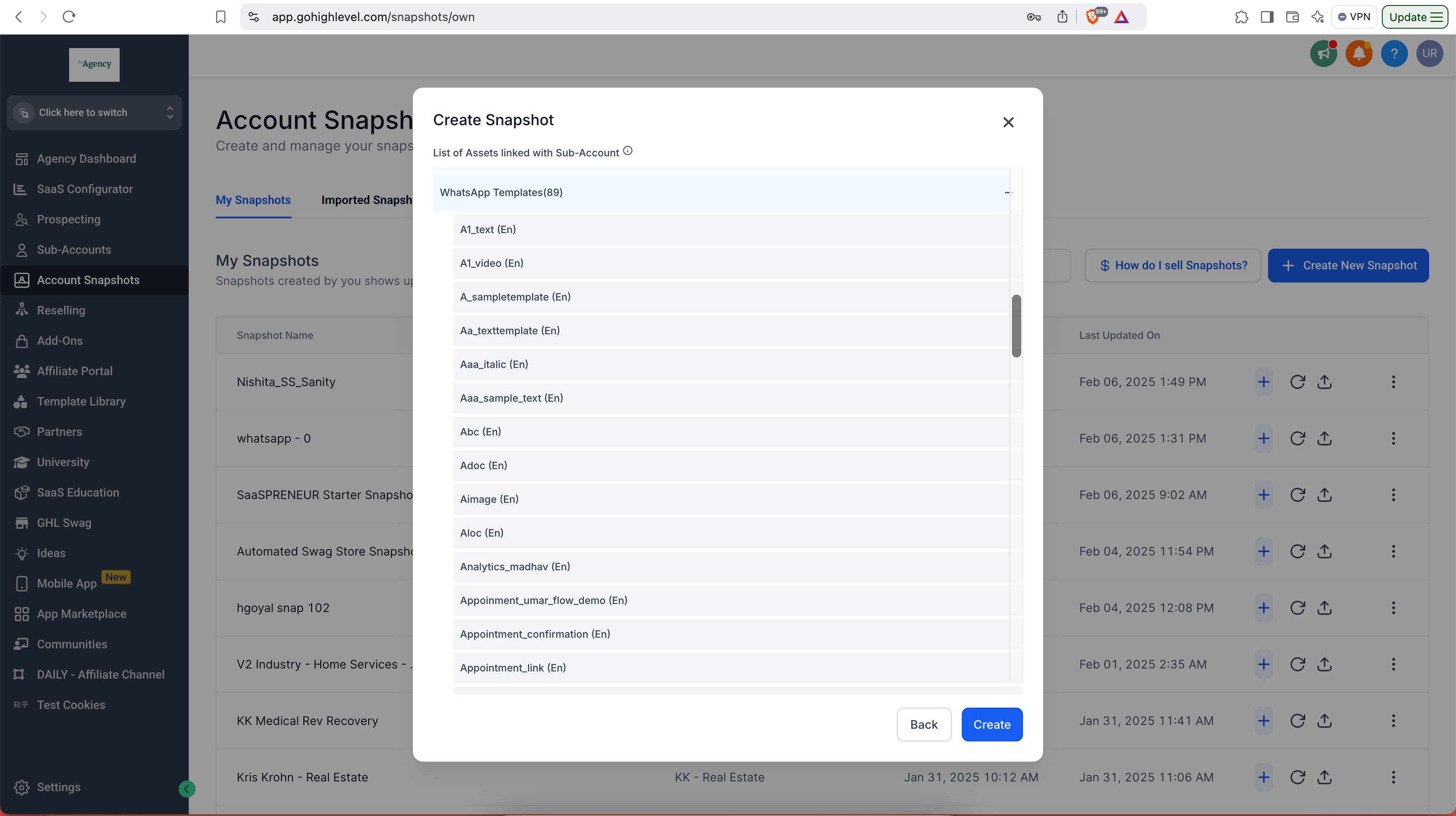
Step 1: Adding Templates to a Snapshot
To begin, navigate to Settings and select Account Snapshots. You can then create a new Snapshot or select an existing one, including WhatsApp Templates as part of the components to be transferred.

Step 2: Importing Templates to a Sub-Account
Move to the sub-account you wish to update, access the Settings, and select the relevant Snapshot. Apply the Snapshot to initiate the template import process, automatically submitting them to Meta for approval.

Step 3: Reviewing and Using the Imported Templates
After the import, check the approval status in the WhatsApp Templates section of your sub-account. Once approved, these templates can be used in workflows, bulk messaging, and conversations.
Use Cases Across Different Sectors
Home Improvement Services
For home improvement businesses, WhatsApp templates can streamline appointment confirmations, send reminders, or provide quick quotes, ensuring timely communication with clients. The ability to replicate templates across multiple service areas or franchises promotes consistency in customer interaction and service delivery.
Legal Practices
Law firms can benefit by using standardized template messages for consultation confirmations, appointment reminders, or updates on legal proceedings. The uniformity and compliance of templates help assure clients of a structured, professional approach.
Medical Practices
In medical settings, templates can assist in managing patient appointments, sending health reminders, and distributing post-care instructions efficiently. This feature ensures patients receive consistent, accurate information without overburdening administrative staff.
Why This Feature is Essential
Saves Time and Reduces Manual Effort
By automating the template recreation process and Meta submissions, agencies can significantly cut down the time spent on these tasks.
Ensures Consistency and Standardization
Uniform messaging helps maintain brand integrity and guarantees that clients receive the same high-quality service across various touchpoints.

Important Considerations
Subscription Requirement
A WhatsApp Subscription is mandatory for the destination sub-account to utilize this feature.
Approval Timelines
While the import and submission processes are automated, time for Meta’s approval can vary, necessitating periodic checks of the template status post-import.
Editability Restrictions
Imported templates remain uneditable until Meta grants approval, ensuring compliance and function integrity.
In conclusion, the addition of WhatsApp Template support in Snapshots is a powerful enhancement for Bosseo CRM users, especially those managing wide-reaching businesses. By providing a structured, automated approach to template management, Bosseo significantly eases operational burdens, offering a tool that enhances both business communication and operational efficiency.